If you’re like me and want to save links to specific emails in your notes, there’s a simple way to do it in the Outlook web app. Keep in mind that these links will only be valid as long as the email is retained, which at my current company the email retention policy is 3 years. So links to emails in my notes are good for 3 years and then broken after that, which is good enough for me most of the time.
The easiest way I’ve found to copy a link to an email is by using a bookmarklet in the Outlook web app to copy the link directly to your clipboard.
Create bookmarklet to copy email link
- Create a new bookmark in the Bookmarks toolbar by typing
Ctrl + din the browser. - Give it a name such as “
Copy Link to Email". - Use the following JavaScript code as the URL:
javascript:(function() {navigator.clipboard.writeText('https://outlook.office365.com/owa/?ItemID=%27.concat(window.location.href.split("/id/")[1]).concat(%27&exvsurl=1&viewmodel=ReadMessageItem%27));})()
Now, whenever you need the link to an email, simply open the email so it’s visible in the right-side pane, then click the bookmarklet. This will copy a URL for the message to your clipboard.
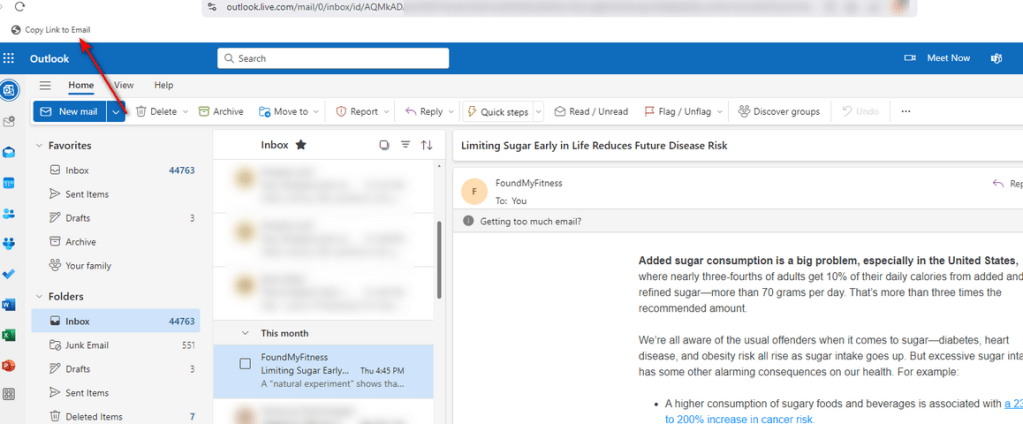
Note: The example image uses an Outlook personal account view, as I didn’t feel comfortable including a screenshot from my work account. The steps are the same for both personal and business accounts, though the URLs differ slightly (see below).
For Outlook personal or family accounts
If you want to copy links from your personal Outlook email, create a bookmarklet with this JavaScript URL:
javascript:(function() {navigator.clipboard.writeText('https://outlook.live.com/?ItemID=%27.concat
(window.location.href.split("/id/")[1]).concat(%27&exvsurl=1&viewmodel=ReadMessageItem%27));})()
Open the email in another tab
If you would prefer to open the email in a new tab rather than copy the link to the clipboard use this JavaScript URL for business accounts:
javascript:(function() {window.open('https://outlook.office365.com/owa/?ItemID=%27.concat(window.location.href.split("/id/")[1]).concat(%27&exvsurl=1&viewmodel=ReadMessageItem%27));})()
And this JavaScript URL for personal accounts:
javascript:(function() {window.open('https://outlook.live.com/?ItemID=%27.concat(window.location.href.split("/id/")[1]).concat(%27&exvsurl=1&viewmodel=ReadMessageItem%27));})()
Resources
- Stack Exchange – Link to Microsoft Outlook 365 Webmail email
- Stack Overflow – How do I copy to the clipboard in JavaScript?
 Joshua Chini